DailyHero. Family sign in

A FIELD GUIDE FOR VVU FAMILIES

Their day.
Their choices.
Their growth.

Autonomy grows with practice. DailyHero helps learners see their commitments, track their progress, and take ownership of their day—with parents and guides there to support them.

Take a look inside

A clearer picture. A shared plan. A learner in the lead.

Their journey.
A little more clarity.
THE FAMILY VIEW↗
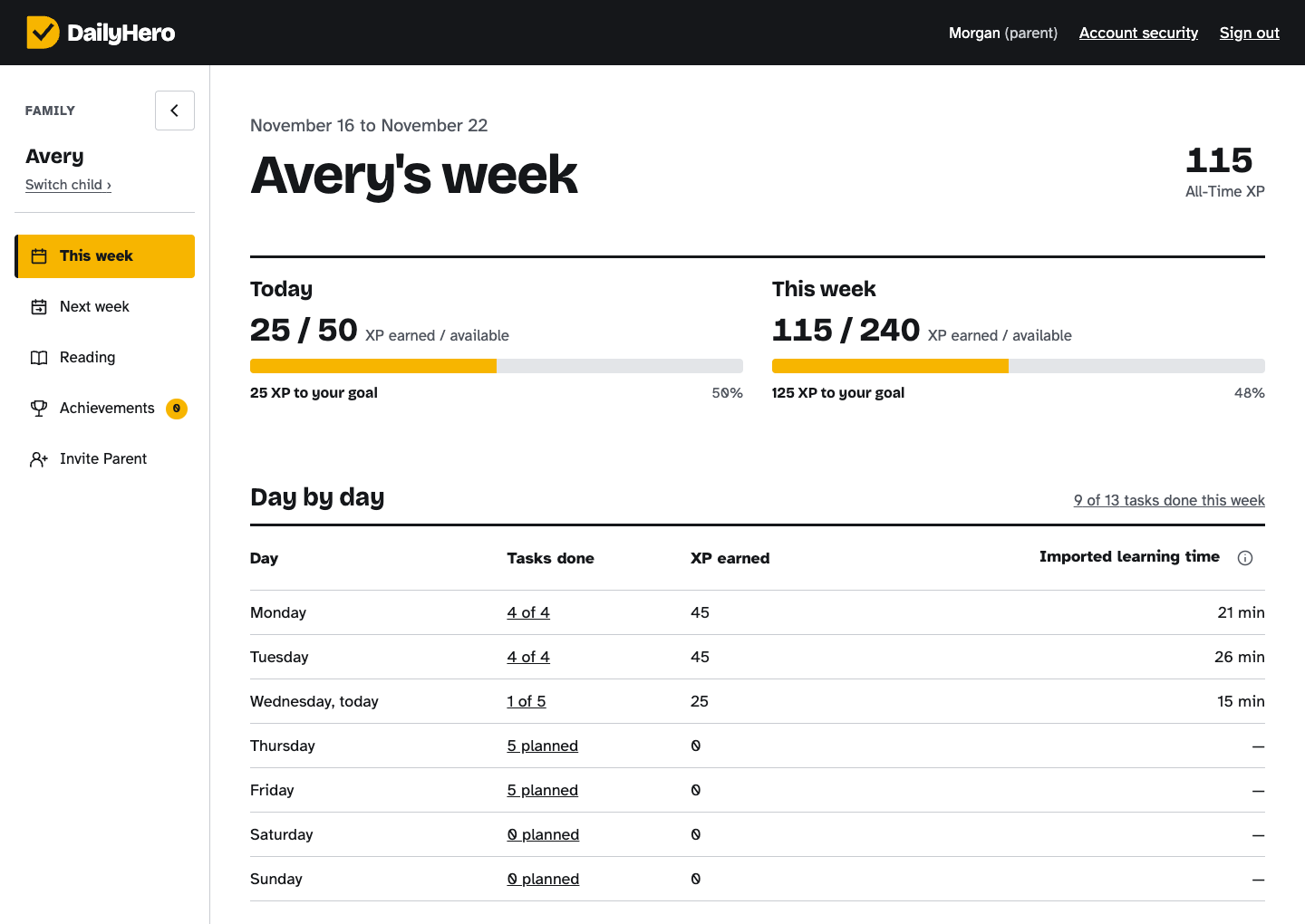
DailyHero family dashboard for fictional learner Avery, showing daily work and weekly focus points.
A little more ownership.
Every day.

Real app screens. Fictional learners and example data.

THE PURPOSE BEHIND THE PLATFORM

The learner leads.
Independence grows
one day at a time.

In an Acton-inspired learning environment, ownership belongs to the learner. Guides create the conditions for growth. Parents offer encouragement and thoughtful questions.

DailyHero makes daily commitments and progress visible, giving learners a place to check what needs doing and reflect on their follow-through. Guides set the daily work; learners build the habit of taking responsibility for it. Parents can stay connected while leaving room for that independence to grow.

Explore Acton’s learning philosophy
“The learner sets goals, tracks progress, and owns the journey”
— Acton Academy, The Acton Model
01 / ASSESSMENTS & CURRICULUM

Find the gaps.
Keep moving forward.

Let’s Go Learn’s ADAM math and DORA reading assessments help guides identify each learner’s strengths and specific gaps. Those results guide targeted curriculum to address the skills that need more support, alongside grade-level work that keeps learners moving forward.

  • Focus extra practice on the specific topics each learner needs.
  • Continue grade-level learning while addressing gaps.
  • Review progress and adjust the daily plan with your guide.

Make limited learning time count: strengthen the skills that need support while continuing to grow.

02 / VISIBILITY & COORDINATION

One picture.
A stronger partnership.

Move beyond “How was school?” See the daily plan, finished work, and reading, so conversations at home connect to what is happening in the studio. Guides can bring assessment findings into that shared conversation.

  • Parents see the children linked to their account.
  • Guides set daily work and review progress over time.
  • If work isn’t getting done at school, parents can help learners accomplish it at home.
  • Assessment screens currently stay with guides; ask yours to walk through the results.

Ask “What challenged you today?” with a little more context.

03 / MOTIVATION & ACHIEVEMENTS

Small commitments.
Visible follow-through.

A clear daily list gives learners something concrete to own. They can check their commitments, record completed work, and reflect on their progress. XP makes follow-through visible, while guides review the evidence over time.

  • See today’s tasks and daily and weekly XP goals.
  • Learners, guides, or authorized parents can record completed work.
  • Celebrate consistency and reflect on the work behind the points.
  • Visit Achievements to celebrate milestones, reading and work streaks, and verified awards from supported curriculum sources.

Points mark effort. Assessments help us understand mastery.

04 / READING FOCUS

Build a lifelong reader.
One book at a time.

Make reading a visible part of the day. Keep current books, pages read, finished books, and learner ratings together, so families and guides can support the habit.

  • Follow reading progress and discover what your learner enjoys.
  • Make reading social by seeing what friends are reading and what they recommend, with school and family sharing settings respected.
  • Use the guide’s working reading level as context when choosing books.
  • Discuss reading skills alongside the reviewed DORA results.

Protect time for reading—and curiosity about the next book.

FROM FINDING GAPS TO SEEING GROWTH

A clearer starting point.
Progress you can see.

Actual learner-profile screens with fictional results.
These guide views help inform the learning plan.

FIND THE NEXT FOCUS

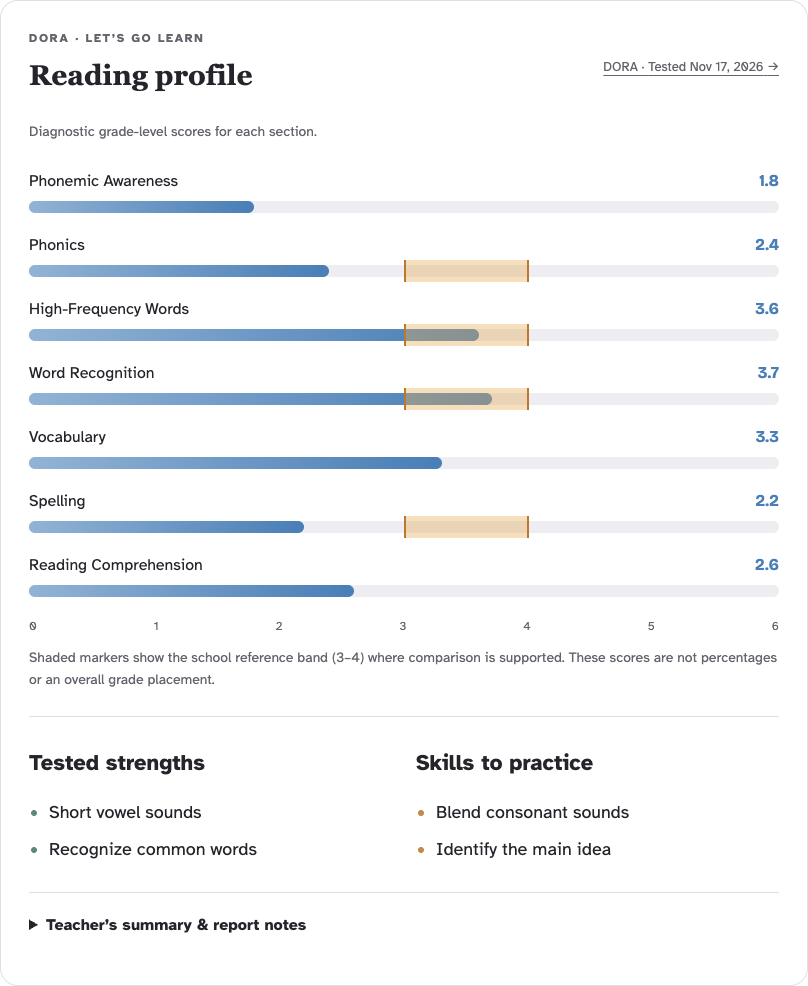
Strengths and gaps,
side by side.

See which reading skills need support and which are strengths. Guides use these findings to choose targeted practice alongside grade-level work.

The shaded band is a school reference—not an overall grade placement.

Fictional reading profile showing section scores, school reference markers where comparison is supported, tested strengths and skills to practice.Enlarge chart ↗
FOLLOW THE CHANGE

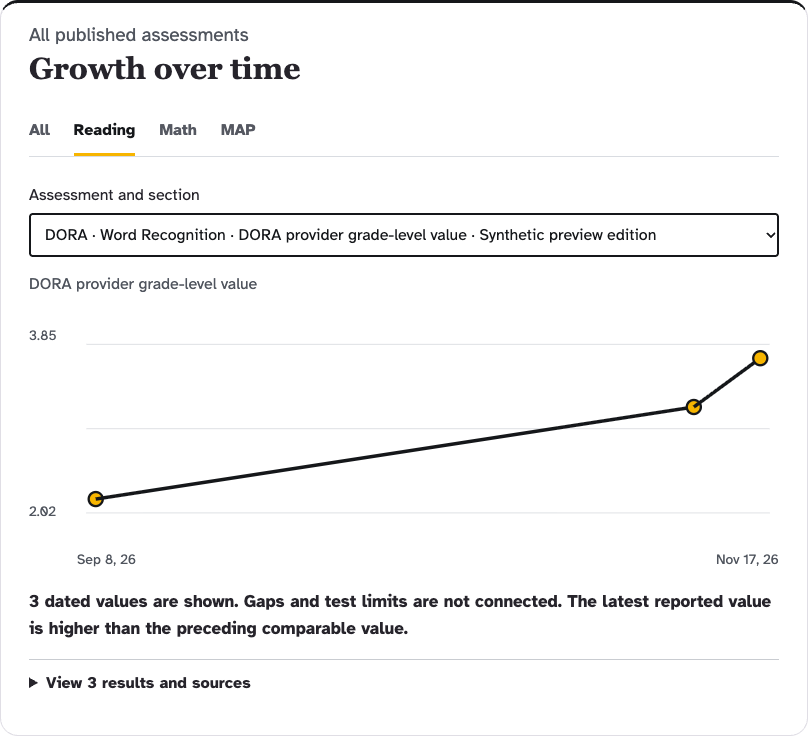
Look back.
See what’s growing.

Compare the same assessment section over time. In this fictional example, word-recognition scores rise across three assessments.

A later assessment helps show what has changed. Finishing practice alone does not confirm mastery.

Fictional DORA word-recognition growth chart with three reviewed scores rising from 2.17 to 3.17 to 3.7 on the same provider scale.Enlarge chart ↗

Fictional examples, not student records or promised outcomes. Assessment profiles are currently available to guides and school staff; ask your guide to walk through your learner’s results.

A WALK THROUGH DAILYHERO

Different views.
The same learner.

From the daily checklist to the bigger picture.
Explore actual screens with made-up example data.

Family dashboard showing fictional learner Avery’s daily tasks and weekly focus points.
The family dashboard

See your learner’s daily work and weekly goals. Start a conversation about effort, challenges, and what comes next.

Illustrative records only. Your view reflects your school’s setup and the available features. The learner profile shown here is the guide’s view.

A LITTLE VISIBILITY GOES A LONG WAY

Open the app.
Start a conversation.

You don’t need to watch every checkbox. Use a quick look to ask a better question—and let your learner do the thinking.

01 “What are you most proud of today?”

02 “Where did you get stuck?”

03 “How will you approach your day tomorrow?”

04 “Tell me about what you’re reading.”

GOOD QUESTIONS, CLEAR ANSWERS

For the
curious parent.

How it works, where AI fits,
and what stays human.

What is DailyHero?

DailyHero brings daily work, motivation points, reading logs, and reviewed assessment results into one place. Learners see their work, parents follow daily progress and reading, and guides review assessment results.

Are you still going to use Acton badges?

Yes! DailyHero helps learners work toward their Acton badge goals by making daily commitments and follow-through visible. It focuses on helping learners accomplish goals each day, building the accountability and habits that support their longer-term goals.

How does this fit the Acton philosophy?

Acton places learners at the center of their own journey: setting goals, tracking progress, and developing self-management. DailyHero supports that independence by making daily commitments and follow-through visible. Guides set the daily work in the app; learners can check what needs doing and record their progress. Parents have context for encouragement and questions while learners practice taking responsibility.

Does this mean more screen time?

The intention is to help learners manage their commitments more independently. DailyHero organizes the plan and records progress; tasks can include reading a physical book or working away from a device. Your guide decides how the platform fits the studio’s daily rhythm.

What do the assessments tell us?

ADAM and DORA provide information about particular math and reading skills. Guides review the results and can discuss them with families. Assessment screens are currently available to staff only. A score is one piece of evidence: it is not a complete picture of your child, and a skill that was not tested is not automatically a weakness. Assessment grade-level scores are not overall grade placements.

Are focus points the same as mastery?

No. XP, or focus points, helps make completed work and effort visible. Points are awarded when work is recorded as done; guides review the evidence over time. Completing a task and demonstrating mastery are different things, so DailyHero keeps assessment results alongside the daily work.

Where does DailyHero use AI?

When enabled by the school, guides can use Cloudflare Workers AI to draft a plain-language assessment summary from selected, checked scores and skills. The guide reviews and can edit the draft before publishing it. Family access to assessment screens is not yet enabled. AI-generated text can be wrong, so it is a starting point for review.

The summary tool sends selected assessment facts, rather than the full report PDF, to the AI service. It is designed to remove student names and contact details from those facts; the remaining assessment information is still sensitive.

DailyHero does not offer student-facing AI chat. Its daily task lists, XP calculations, reading logs, and assessment charts do not require generative AI. Tools that read report text and suggest fields also require guide review; they do not automatically publish results. Separate learning providers may have their own AI features and policies.

Does AI decide what my child should learn?

No. The optional AI feature drafts an explanation of checked assessment facts. Guides remain responsible for reviewing results and setting the daily plan. AI does not independently assign work, diagnose a learner, or decide their grade placement.

How does DailyHero support reading?

Learners and families can keep track of books, record pages, and rate finished books. Guides maintain a working reading level to inform book choices. That level is entered by a guide; DailyHero does not automatically turn a DORA score into a book recommendation or a reading placement.

Who can see my child’s information?

Access follows school roles and family relationships. Parents see children linked to their account, and authorized staff see the records they need for their role. Assessment screens and original reports are currently restricted to authorized staff. School book-sharing settings control participation and whether a first name is shown.

See the DailyHero privacy policy for details, including service providers and AI processing.

How do I get access or correct something?

Your school arranges your family account and connects you to your learner. Once invited, use Family sign in. If work, reading information, or an assessment looks wrong, bring the specific item to your guide so it can be checked. The public examples on this page are fictional.
THE NEXT STEP IS A SMALL ONE

Their day to own.
Your role to support.

Have a family account? Take a look together.
Need access? Your guide can help you get started.

Family sign in

The family dashboard

Family dashboard with fictional example data.